CarX Builder

Build Lab · From a class to a finished tune

Build Lab: a full CarX Street build from a class and a style

Choose a car, the class you want to reach and how you drive. Build Lab picks the engine and the parts, then computes every setting of the tune. No dyno screenshot needed.

Each account can create one Build Lab build for free. More builds need Premium+.

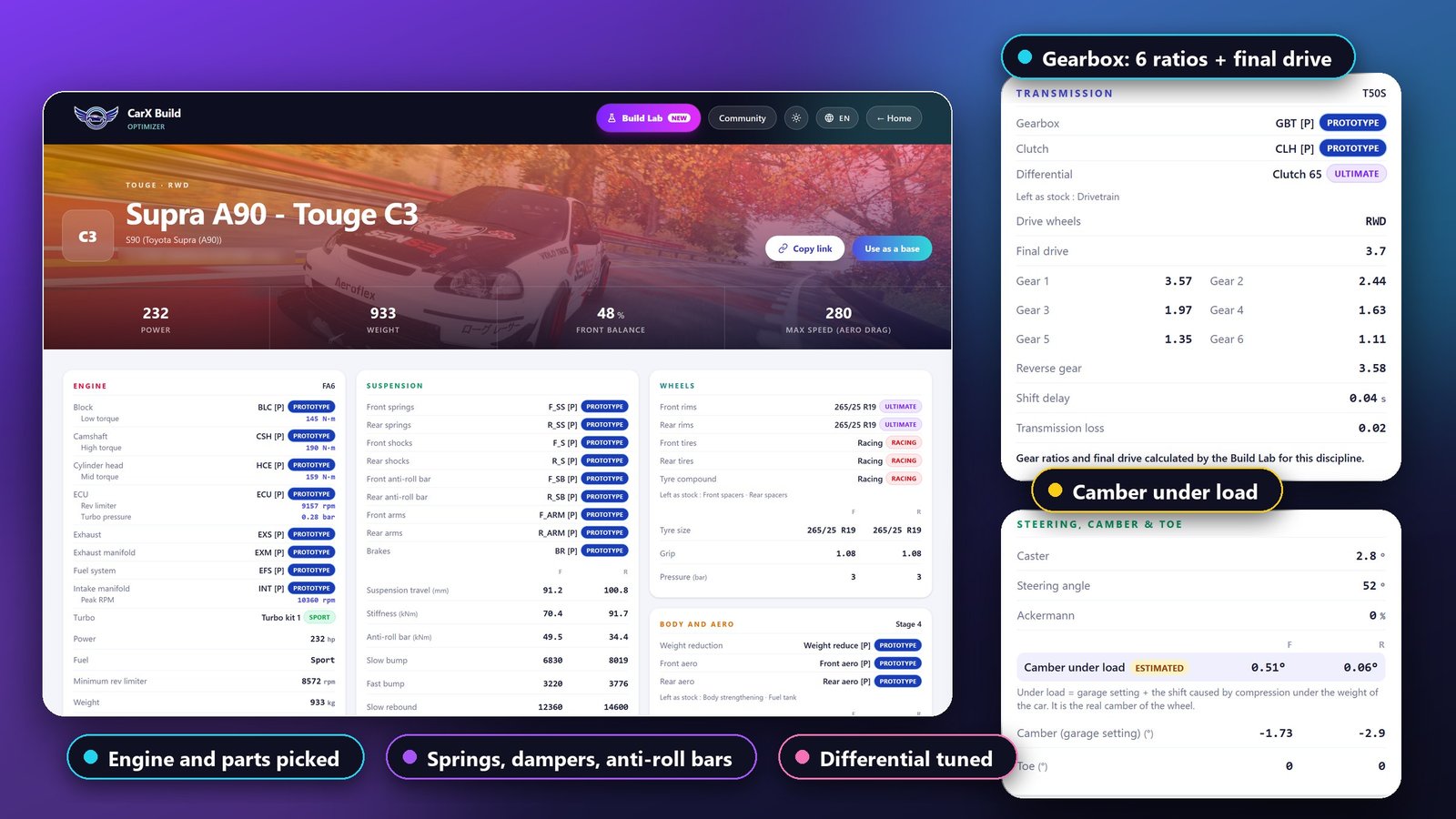
A Build Lab build page for a Toyota Supra A90 in C3 touge: engine and parts, gearbox ratios, suspension, differential, camber under load and brakes
8
classes, C1 to CS+
6
driving styles
3
drivetrains: FWD, RWD, AWD
0
dyno screenshots needed

Tuning a CarX Street car takes more than good parts

You pick a class, you buy parts, you find that the car is a few points too high or too low, you swap a part, and you start again. Then comes the tune itself: gearbox, differential, springs, dampers, camber. Each of them depends on the engine, the weight, the tyres and the way you drive.

Build Lab does that work for you, in the right order. It builds the car for the class you chose, then tunes that exact car. You get a complete build sheet, with every value ready to copy in the game.

How it works

  1. 01

    Pick car, class and style

    Choose the car, a target class from C1 to CS+ (CS+ has no cap) and a driving style: touge, grip, track, gymkhana, drift or drag. Add the fuel, the drivetrain and the tyre compound if you want.

  2. 02

    The engine and parts are chosen

    Build Lab tests the engines and parts available for the car and keeps the combination that fits the class and the style.

  3. 03

    Get the full tune

    Gearbox, differential, suspension, alignment and brakes are computed for that build and shown as values to copy in game.

  4. 04

    Save it, share it, adjust it

    The build gets its own page with a share link. With Premium+ you can change any part by hand and update the same build whenever you want.

One sheet with everything you need in the garage

This is a real build page generated by Build Lab: a Toyota Supra A90, touge, class C3. The engine and the parts to install, the gearbox, the differential, the suspension, the alignment and the brakes are all there, section by section, in the order of the in-game menus.

  • Every part to install, with its tier
  • Power, weight, front balance and top speed at a glance
  • Gear ratios and final drive for the chosen style
  • Springs, anti-roll bars and four damper settings per axle
  • Camber, caster, steering angle and Ackermann
  • Brake bias, brake torque and tyre pressure

What Build Lab computes, and how

No guesswork and no preset per car. Each value comes from a calculation on your build.

Engine, parts and class

Build Lab tests the engines and the parts available for the car, sets every part slider, and stops as close as possible to the class limit. For touge and most styles it starts from the lightest chassis, then brings the power down to the class: you get a light car at the class score, not a heavy car that barely fits. CS+ has no cap, so there Build Lab looks for the highest power-to-weight the car can reach.
Sport fuel and rev limiter

Sport fuel does more than add torque: the game also stretches the power curve along the rev range and raises the limiter. Build Lab uses that race curve, not the garage curve. It also shows the minimum rev limiter you need, so the engine does not cut before the point where you want to shift.

Tyres and aero

Rims and tyres are picked for the style, the tyre pressure is set to the 3 bar maximum, and the downforce and drag are set for the build. The tyre compound is your choice, from Street to Racing+.

Gearbox

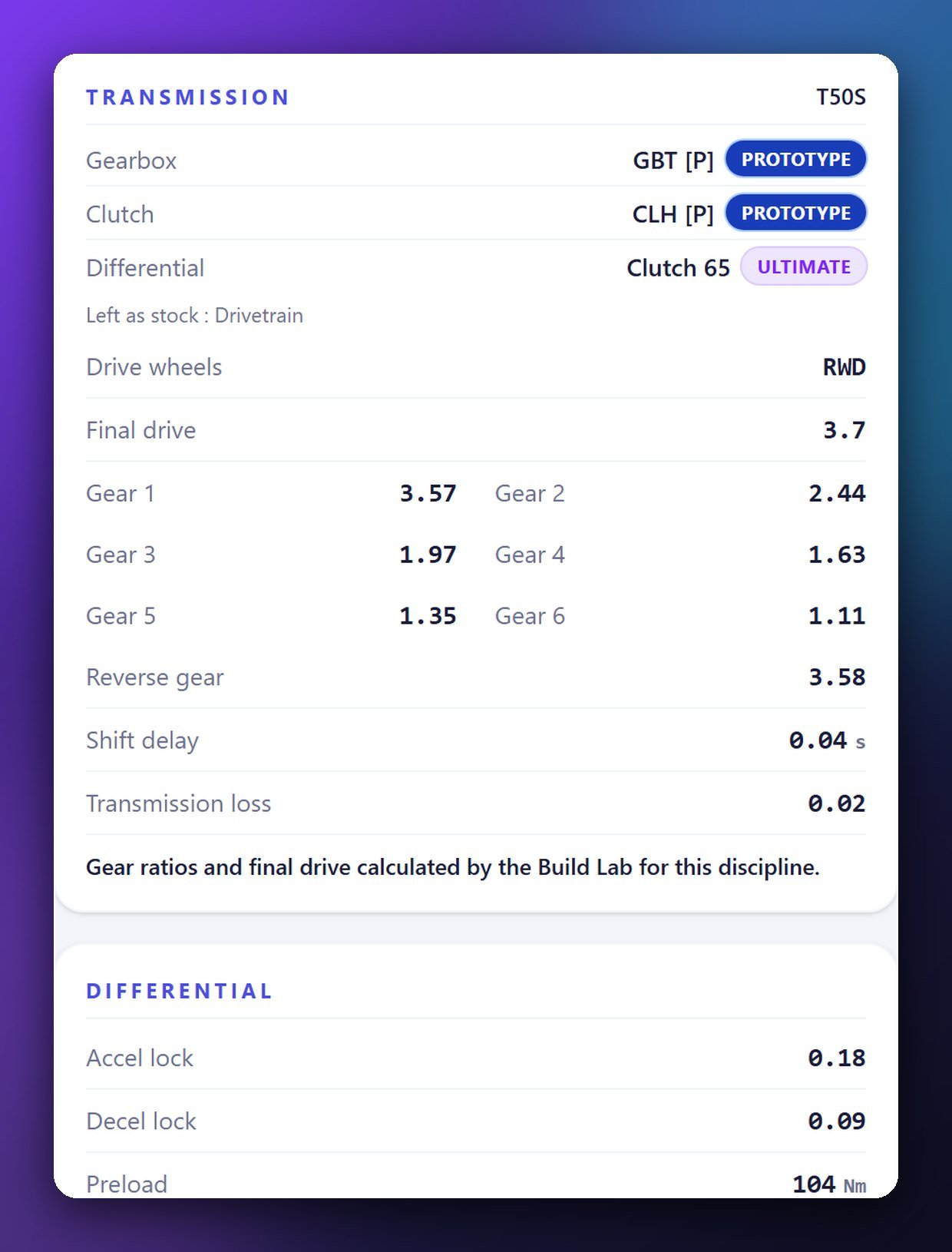
Ratios are evenly spaced, the first gear is chosen for the 0-100 and 0-60 times, then the whole box is refined: final drive and every ratio, on the 0-100 and 60-160 times, without giving up top speed. For drag, the gearing follows the distance of the race you pick. The result is a box built for your car, not a generic ratio table.

Differential

The preload follows the maximum torque of the engine. Acceleration lock is set to keep the rear from letting go before the front, and deceleration lock is half of it, so the car stays calm when you lift. These are calculated starting values: you can adjust them to your driving.

A Build Lab build page for a Toyota Supra A90 in C3 touge: engine and parts, gearbox ratios, suspension, differential, camber under load and brakes

Suspension and dampers

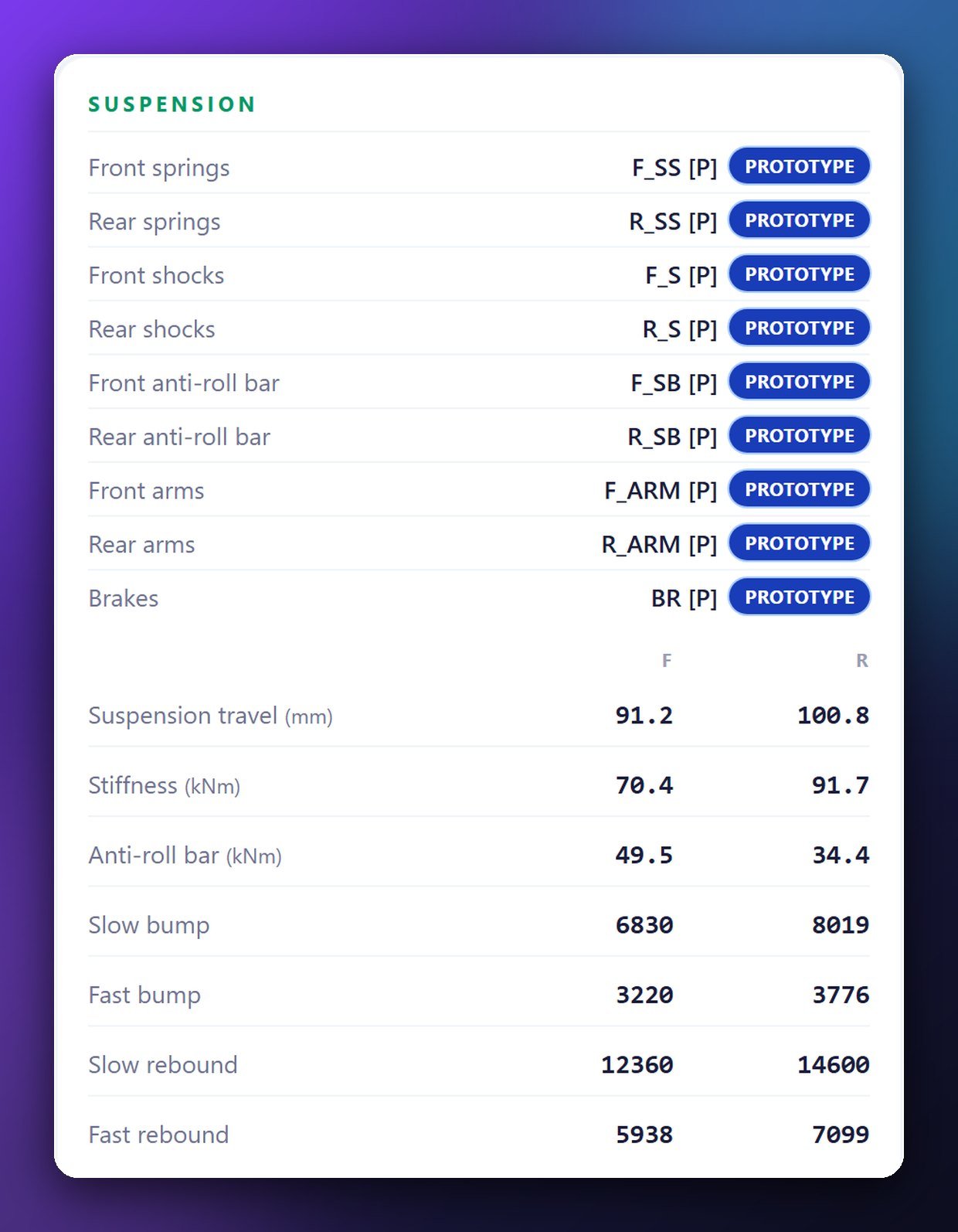
Spring rates come from a target frequency for each axle and the weight it carries. Spring travel keeps a reserve before the bump stop, anti-roll bars are balanced front to rear, and each axle gets four damper settings: slow and fast, bump and rebound. Touge, grip and track get firmer dampers than drift or drag.

A Build Lab build page for a Toyota Supra A90 in C3 touge: engine and parts, gearbox ratios, suspension, differential, camber under load and brakes

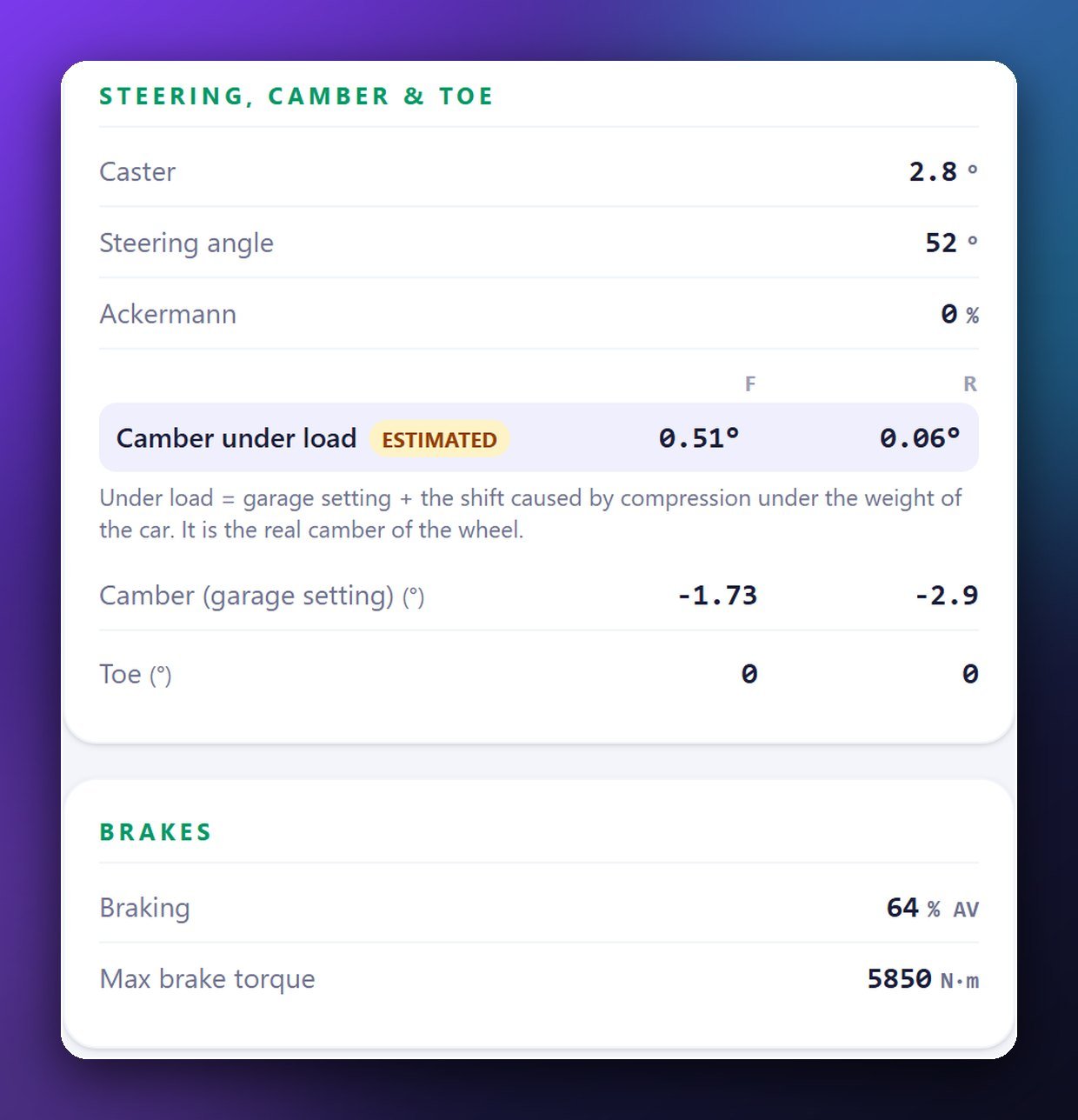
Camber under load, caster and steering

Camber is solved so that the loaded outer wheel stays as close to 0° on the ground as possible in a corner, with steering angle and body roll included. Caster is chosen with it, and Ackermann and steering lock follow the style. The sheet also shows the camber under load, the real camber of the wheel once the car sits on its springs.

Brakes

Brake bias and brake torque are computed from the weight, the height of the centre of gravity and the downforce of the build, so the front does not lock first.

A Build Lab build page for a Toyota Supra A90 in C3 touge: engine and parts, gearbox ratios, suspension, differential, camber under load and brakes

Yours to change: adjust, reopen, update

A generated build is a starting point, not a locked file. The adjustment panel is on the Build Lab page, always visible.

  • Change any part by hand: the result recalculates and the tune follows
  • Put your own rims, tyres, engine parts or gearbox on the car
  • Reopen a saved build and update the same page: link, share and name stay
  • Every update keeps the previous version in the build history

What to expect, honestly

Build Lab is built on the game's own data: parts, curves, ratios and rounding steps. Its calculations are checked case by case against a separate reference builder, to make sure the same car gives the same result.

Not every value is a rule of the game. The differential, the dampers and the aero are calculated starting points, based on physics and on the style you chose, and the tune is meant to be adjusted to your driving. When the calculation improves, your old builds offer an update, and the previous version stays in the history.

Free and Premium+

Free account

  • One complete Build Lab build
  • Build page with a share link
  • The classic calculator and the guides

Premium+

  • Full Build Lab: all classes and all styles
  • Adjust any part by hand
  • Reopen and update your builds
  • Version history and build comparison
Premium+ →

FAQ

What is Build Lab?

A feature of CarX Street Build Optimizer that picks the engine, the parts and every setting of a car for a target class and driving style, without a dyno screenshot.

Is Build Lab free?

Each account can create one Build Lab build for free. Creating more needs the Premium+ plan.

Which classes does it cover?

Eight target classes, from C1 to CS+ (CS+ has no cap: it looks for the highest score the car can reach), for touge, grip, track, gymkhana, drift and drag.

Does Build Lab replace the calculator?

No, they work together. The calculator tunes a car you already built: it needs your dyno screenshot and your parts. Build Lab starts from a class and builds the car, then tunes it.

Can I use my own parts?

Yes, with Premium+. The adjustment panel lets you change any part of the generated build, and the values recalculate. You can also reopen a saved build to change its parts later.

How accurate is it?

The engine, the weight, the gearbox and the camber follow the game's data and are checked against a reference builder. The differential, the dampers and the aero are calculated starting points that you adjust to your driving.

Which cars and options are available?

The cars of the game data, with the drivetrain you choose (FWD, RWD or AWD), stock or sport fuel and a tyre compound from Street to Racing+. The engine can be left automatic, imposed, or searched among all swaps for the lightest build.

What happens to my builds when Build Lab improves?

A build calculated by an older version shows an update window. Updating recalculates the gearbox, differential, suspension, camber and brakes. The previous version stays in the build history, and your link and sharing do not change.

Build your first car in a minute

Create a free account, pick a car and a class, and look at the build sheet.

Each account can create one Build Lab build for free. More builds need Premium+.

Build Lab · New

Pick a car and a class. Get the whole build.

Engine, parts and every setting, computed for you from a class and a driving style. No dyno screenshot needed.

Build my car for free

One Build Lab build free on every account.

See how it works